
How to Use Custom Product Pages to Drive App Growth
A practical guide to organic and paid CPP strategy in App Store Optimization & Apple Ads.
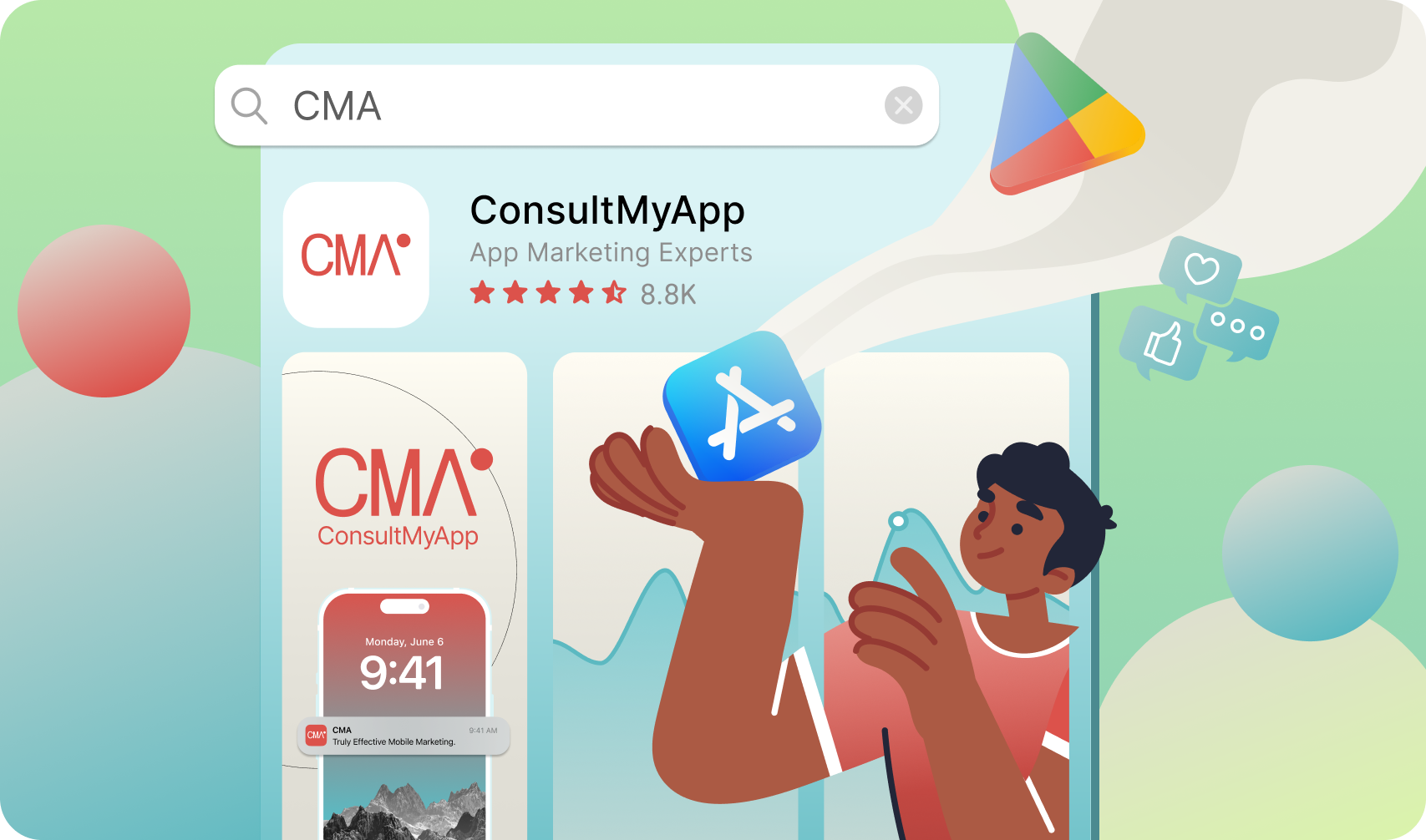
The App Store…
The make-or-break section of the funnel for most apps.
This is where months of creative work, budget, and optimisation either turn your target audience into tangible downloads and loyal users - or fwoom - they disappear to a competitor listing. The company blood, sweat, and tears wasted.
It’s critical that your App Store listing is airtight, especially in the U.S. and UK - two of the world’s most valuable app markets. In the U.S., iPhones account for roughly 58% of smartphone users, making iOS the dominant platform. In the UK, iOS and Android share the market at near parity, with iOS often sitting around 49% of smartphone OS share.
With such strong iPhone presence in both countries - where iOS users represent a massive portion of global app revenue and engagement - App Store Optimization (ASO) is an absolute must if you want to grow.
That’s why Apple has given us tools to strengthen this vital part of your funnel. Today, we’ll talk about Custom Product Pages (CPPs).
What Is a Custom Product Page (CPP)?
A Custom Product Page is an alternative version of your App Store listing that can be shown to users based on either paid Apple Ads campaigns or specific organic search terms.
Each CPP can feature different screenshots, preview videos, and messaging, allowing your app to speak to why a user arrived - not just what your app does.
In practice, a CPP answers one clear question:
“Is this relevant to what I just searched for?”
Quick tips:
• Treat Custom Product Pages (CPPs) as entry points, not homepages.
• Each CPP should exist to answer one install motivation.
• If you can’t summarise a CPP’s purpose in one sentence, it’s too broad.
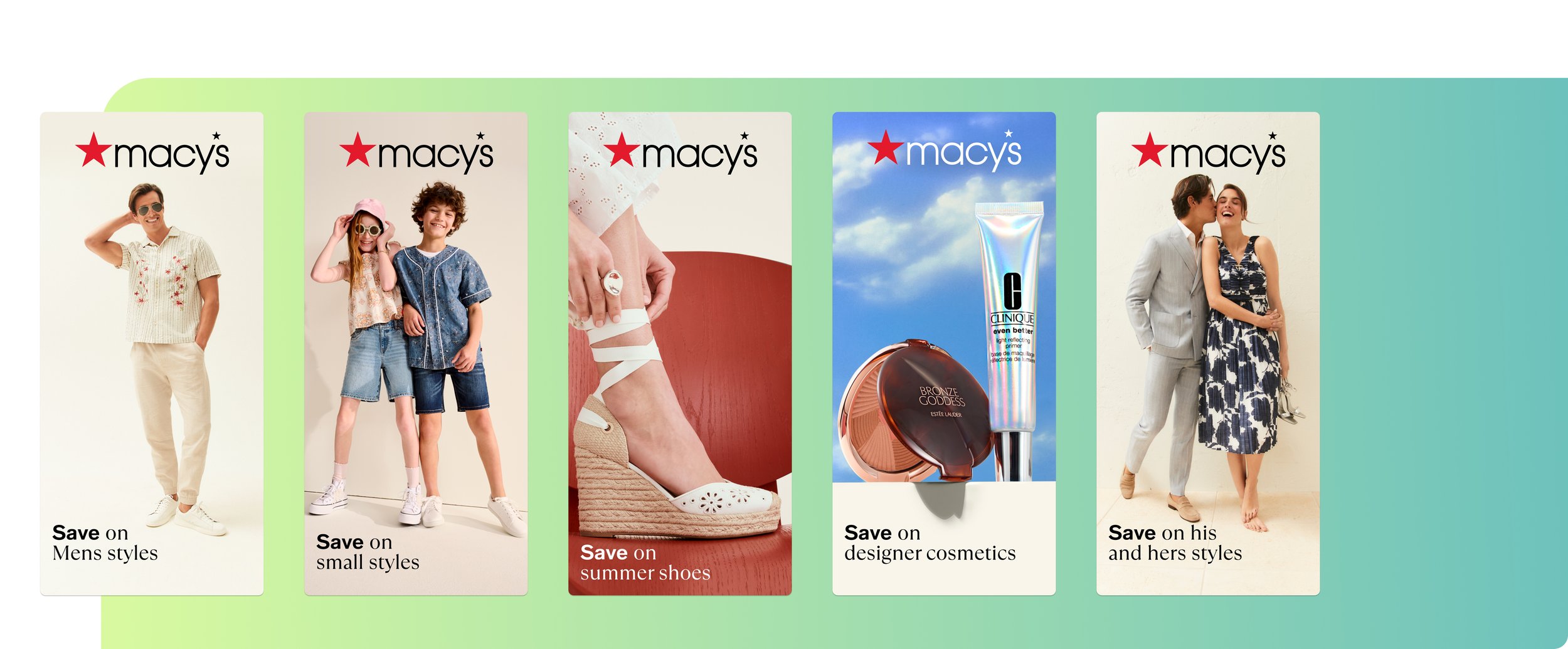
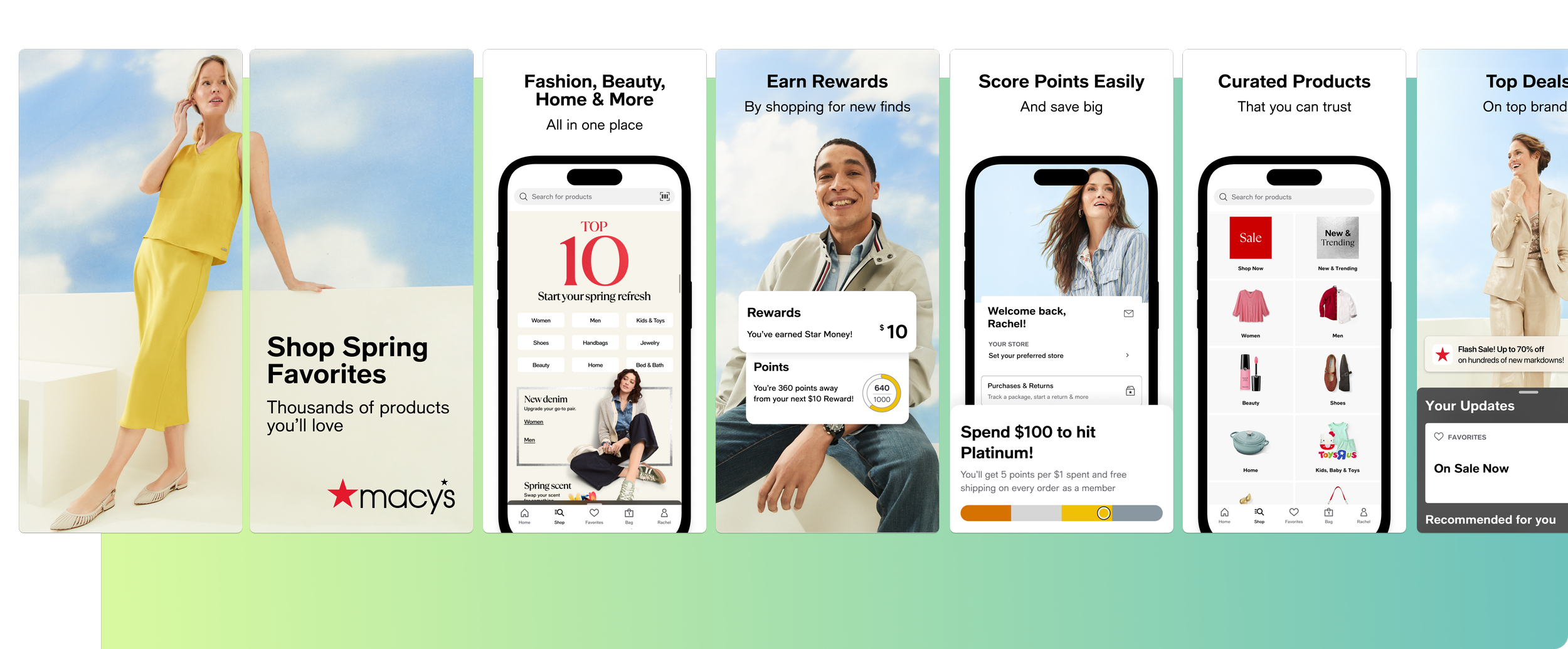
Macy’s Custom Product pages. Each an example of changing the first screenshot to match intent.
How to Build a High-Performing Custom Product Page (CPP) Strategy
Apple’s Organic Custom Product Pages (CPPs) let ASO behave more like paid marketing or CRM. You can segment audiences, tailor creative, and personalise journeys - all within the store itself.
It’s a new way to capture downloads, reduce waste, and strengthen every layer of the funnel.
But the opportunity isn’t in building more CPPs. It’s in building the right ones.
CPPs aren’t creative indulgences. They’re decision tools.
Used well, they confirm relevance and shorten the path from search to install.
Used poorly, they add noise and complexity without return.
This guide focuses on that decision layer - how to spot high-impact CPP opportunities and act on them with intent.
1. Attention or Intention: The Foundation of Every Custom Product Page Strategy
It really comes down to two things - attention or intention.
Every CPP you make will lean one way or the other. You’re either trying to steal attention (from a competitor, maybe) or match intention.
Example? Okay.
I’m a would-be customer of yours. I’m in the U.S., looking for a betting app. I type “baseball.”
Now, if we build a Custom Product Page specifically targeting people who love baseball, that’s matching intention.
My motive is already formed. I’m not browsing, I’m deciding. I want something that screams baseball - visuals, tone, copy - and I want to get it in less than three seconds.
(That’s roughly how long the average user spends looking at an App Store listing before deciding to tap or scroll away - between 2.8 and 3.5 seconds.)
That’s matching intention. You’re confirming exactly what I came for.
Now, attention is a little different.
Let’s say it’s baseball season. Every sportsbook app on the store is bound to be showing baseball visuals: pitchers pitching, catchers catching, hitters hitting.
You might have team-specific visuals (if your app has the license), but the point is that everyone is covering the same seasonal intent. You don’t have the edge here.
At that stage, it’s no longer about intention. Every app is already meeting it. It becomes about attention.
Maybe you create a CPP targeting a competitor’s brand term - users already searching for them. Then you hit them with something stronger - a bigger welcome bonus, a faster withdrawal promise, or a local edge they can’t ignore.
That’s how you win downloads.
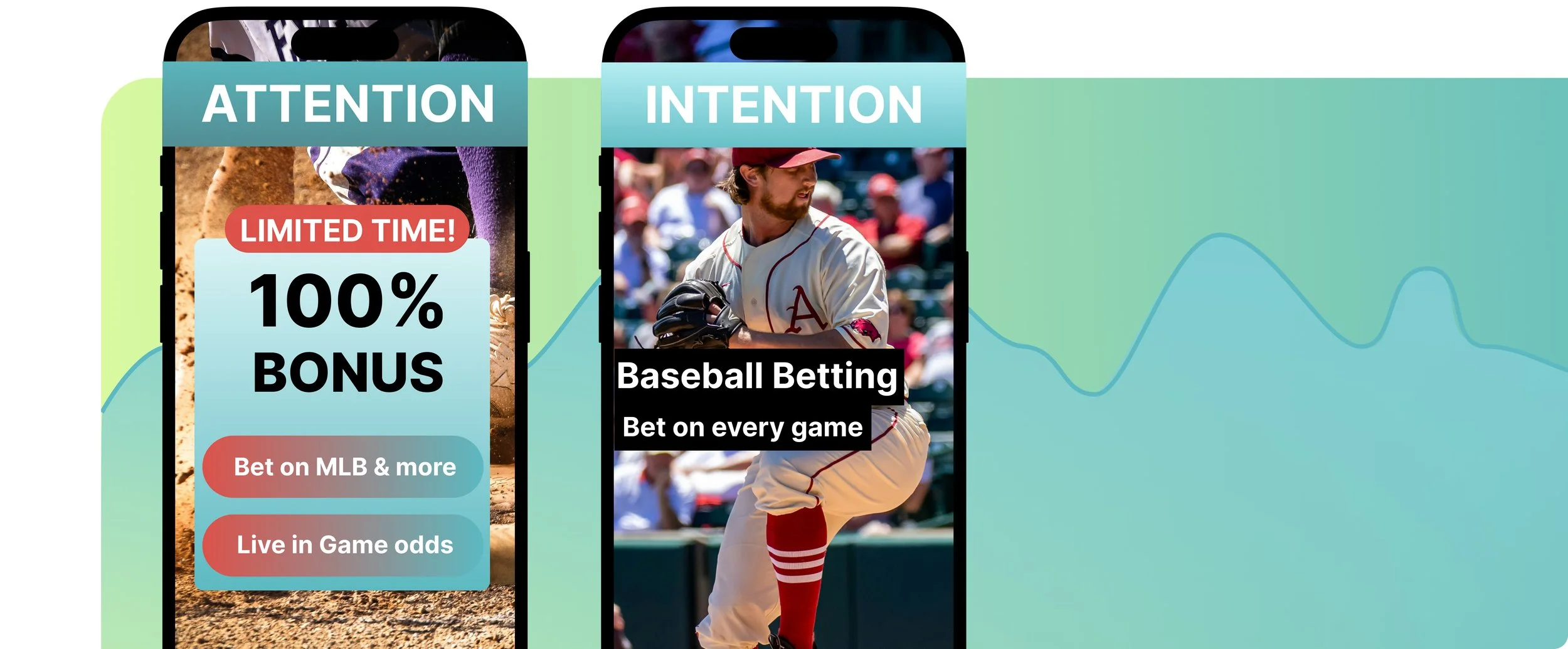
To recap, ask yourself:
Are we trying to steal attention?
• For example, building a CPP around a competitor’s brand name or a trending search.
• The goal: intercept, redirect intent, and reframe the choice.
• This is attention-led creative - grabbing focus before relevance is proven.Or are we trying to match intention?
• For example, building a CPP around a high-volume category term such as “baseball” or “sleep tracker.”
• The goal: confirm relevance instantly and reduce hesitation.
• This is intention-led creative - mirroring the user’s exact mindset.
2. The Non-Negotiable Requirements for Organic CPPs
Organic CPPs don’t surface automatically. For one to appear, a few technical conditions must be met:
• The keyword must exist in your App Store Connect keyword field, or
• Be a term Apple already associates with your app, and
• Be explicitly assigned to the CPP.
Without that link, the CPP won’t trigger.
Example:
APPlyzer data for MyFitnessPal (iOS, US) shows the keyword “macro tracker” ranking at #12 with no assigned CPP. The demand exists - the page doesn’t. That’s a missed opportunity sitting in plain sight.
Practical takeaways:
• Audit keyword eligibility before planning any CPP creative.
• Treat keyword assignment as a go/no-go gate.
• If a keyword can’t be assigned, it isn’t a CPP opportunity.
3. Why Search Volume and Ranking Position Matter
CPPs only create impact when there’s real demand behind them.
High-value CPP opportunities share three traits:
Meaningful daily search volume.
Keywords you already rank for or are close to ranking for.
A clear, distinct install motivation.
If a keyword doesn’t already drive impressions, a CPP rarely justifies the effort. CPPs amplify demand - they don’t create it.
Example:
Using APPlyzer Chat, the keyword “sleep tracker” on iOS (US) shows daily search volume of 48K and a search score of 42.
Calm ranks #7; Sleep Cycle ranks #3. Both already use CPPs for this term. That tells you where the bar is set - and where a new entrant could win on conversion.
Practical takeaways:
• Prioritise keywords where impressions already flow.
• Use CPPs to improve conversion, not discover demand.
• Low-volume terms are better handled by metadata optimisation.
4. How to Spot CPP Opportunities with APPlyzer 26
Manually finding CPP opportunities can take days. APPlyzer 26 compresses that into minutes.
It helps teams quickly identify:
• Keywords with rising volume you already rank for
• Competitor terms gaining traction
• Screenshots that don’t match search intent
• CPPs that could move conversion meaningfully
Example:
Let’s take Revolut, one of fintech’s biggest names.
According to APPlyzer data, Revolut currently ranks between #48 and #97 in the Finance category (iOS, US) over the past month. That’s strong category visibility, but not top-tier, especially for a brand with global recognition and a heavy paid presence.
Here’s where it gets interesting. APPlyzer keyword data shows “travel money” averaging around 38K daily impressions in the U.S., with a search score of 36. That’s solid search demand and moderate competition. Despite owning the “spend abroad with no hidden fees” proposition, Revolut doesn’t rank in the top 10 organically for that term.
Now, check the App Store listing itself.
The visuals lead with broad positioning like “Send, spend and save smarter,” “Banking reinvented,” and “Manage your money better.” These are great for awareness but not for intent.
A user searching “travel money” already knows what they want: a simple way to spend abroad without hidden fees. They don’t need to see stock cards, crypto icons, or investing dashboards. They want reassurance that this app will work when they tap their card in another country.
That’s where a Custom Product Page could make the difference.
If Revolut built a CPP for “travel money,” it could open with:
“Spend abroad with no hidden fees.”
“Hold 30+ currencies and exchange instantly.”
“Track every purchase in real time.”
Visuals could show the in-app currency exchange screen, card transactions abroad, or a push notification confirming “£0.00 in foreign fees.”
That’s instant validation for intent.
In this case, Revolut has the product fit. It just isn’t confirmed visually at the point of search. That’s the gap a CPP closes.
Practical takeaways:
• Use APPlyzer Chat to find keywords where demand exists but your creative doesn’t confirm intent.
• Check if your ranking is close (positions 10–30 are your CPP sweet spot).
• If the search motive is clear and your screenshots don’t reflect it, that’s your next CPP brief.
5. Turning Insight into Strategy by Industry
Once the data is clear, CPPs stop being experiments and start becoming structured strategy.
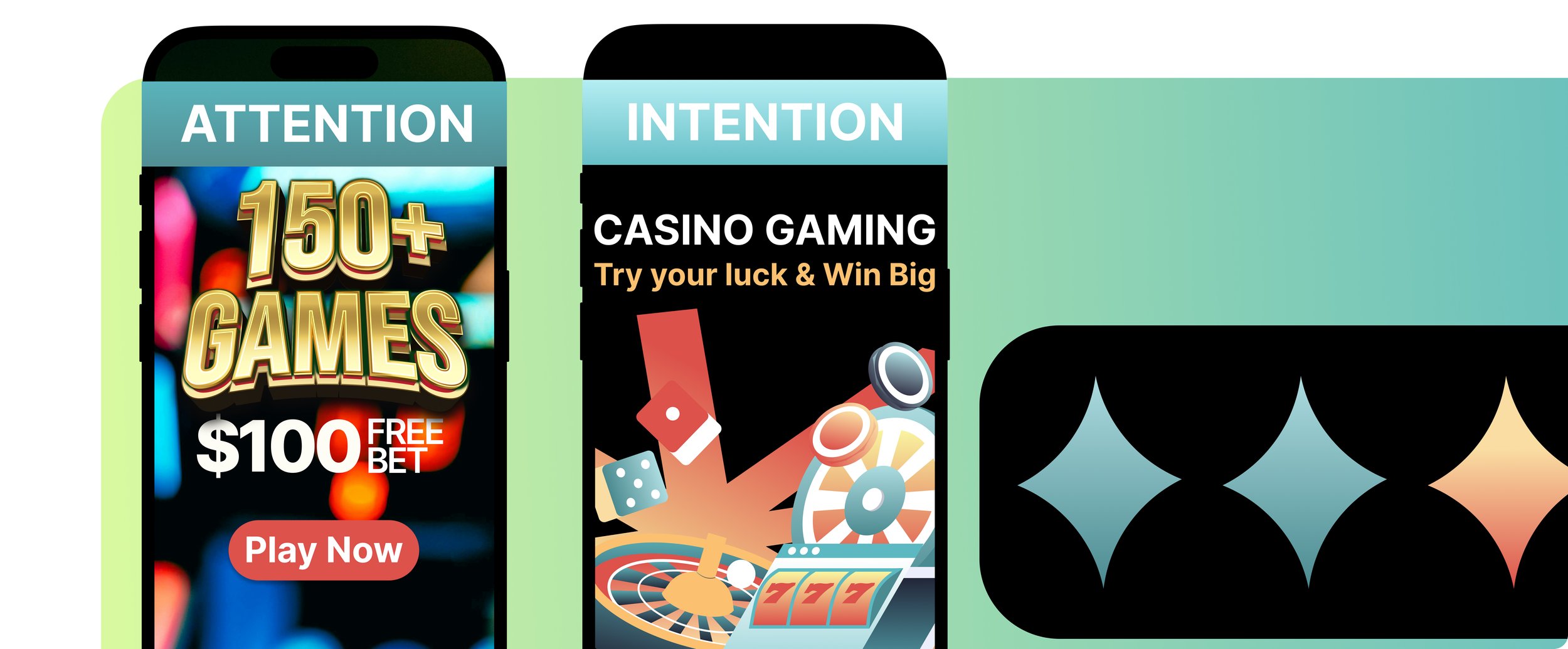
iGaming:
CPPs often focus on competitor brand searches during major sporting events, with messaging built around stronger sign-up bonuses, faster withdrawals, or local relevance.
Example: APPlyzer category data shows Bet365 and SkyBet rotate CPPs around match weekends, seeing rank lifts within 48 hours - a clear link between event intent and creative timing.
Retail:
Retail CPPs often target brand terms a retailer stocks but doesn’t own.
For example, John Lewis might build a CPP for “Ralph Lauren,” focusing on availability, range, and trusted fulfilment. The intent isn’t the retailer - it’s the product.
Health & Wellness:
Sleep apps often use darker visuals, night-first framing, and screenshots referencing rest outcomes. Messaging shifts from general wellness to immediate rest.
Practical takeaways:
• Build CPPs around moments, not features.
• Plan CPPs seasonally, not ad hoc.
• Refresh or retire CPPs as intent changes.
6. APPlyzer Snapshot: CPP Opportunity Signals (iOS, US)
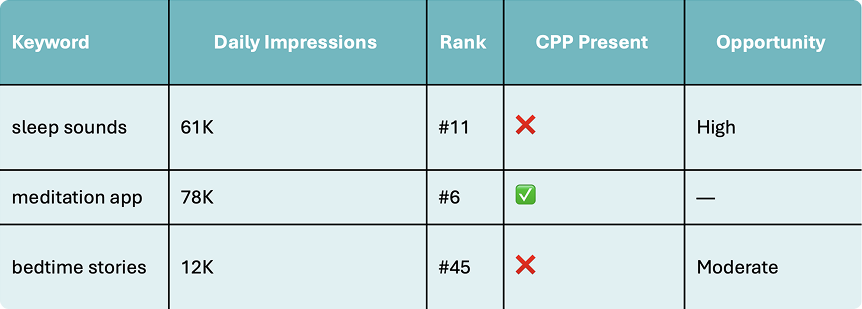
CPPs move the needle only when the data already points to intent. A quick search using APPlyzer Chat gives us a speed-to-insights method of spotting these opportunities.
Conclusion: Why CPPs Are a Core App Marketing Lever in 2026
App marketing in 2026 is driven by relevance at the moment of intent.
Users reveal what they want through search behaviour, seasonality, and category language. CPPs allow brands to respond inside the App Store, not after the install.
When expectations are met early, conversion improves, paid efficiency strengthens, and retention often follows.
That’s why CPPs are no longer optional enhancements - they’re a core lever in modern ASO.
The teams that win won’t be those with the most pages. They’ll be the ones who identify the right opportunities and act on them decisively.
That’s where Custom Product Pages stop being pages - and start becoming leverage.
Want to build a solid strategy of your own? Let’s chat.