Top 5 Retail App Marketing Tips for 2026

The retail industry is one of the most visibly evolving markets.
Retail demand doesn’t disappear - it shifts, mutates, reinvents itself.
From bricks-and-mortar,
to catalogues and telephones,
to the .com boom,
and finally - our personal favourite - apps.
Each shift brings new skills, disciplines, and strategies for marketers to learn. These are the surfboards that keep us riding the next wave of retail demand.
In 2025, retail brands experimented with more ways to present their app storefronts. AI accelerated the research work, and the competitive bar moved higher.
Looking to 2026, the same opportunities exist for everyone, but the brands who leave their competitors behind will be the ones who move from insight to execution the fastest.
The challenge isn’t access. It’s action.
So, let’s talk about what you can do to ramp up your retail app marketing in 2026.
Tip 1: Organic Custom Product Pages and Custom Store Listings Become A Major App Marketing Lever
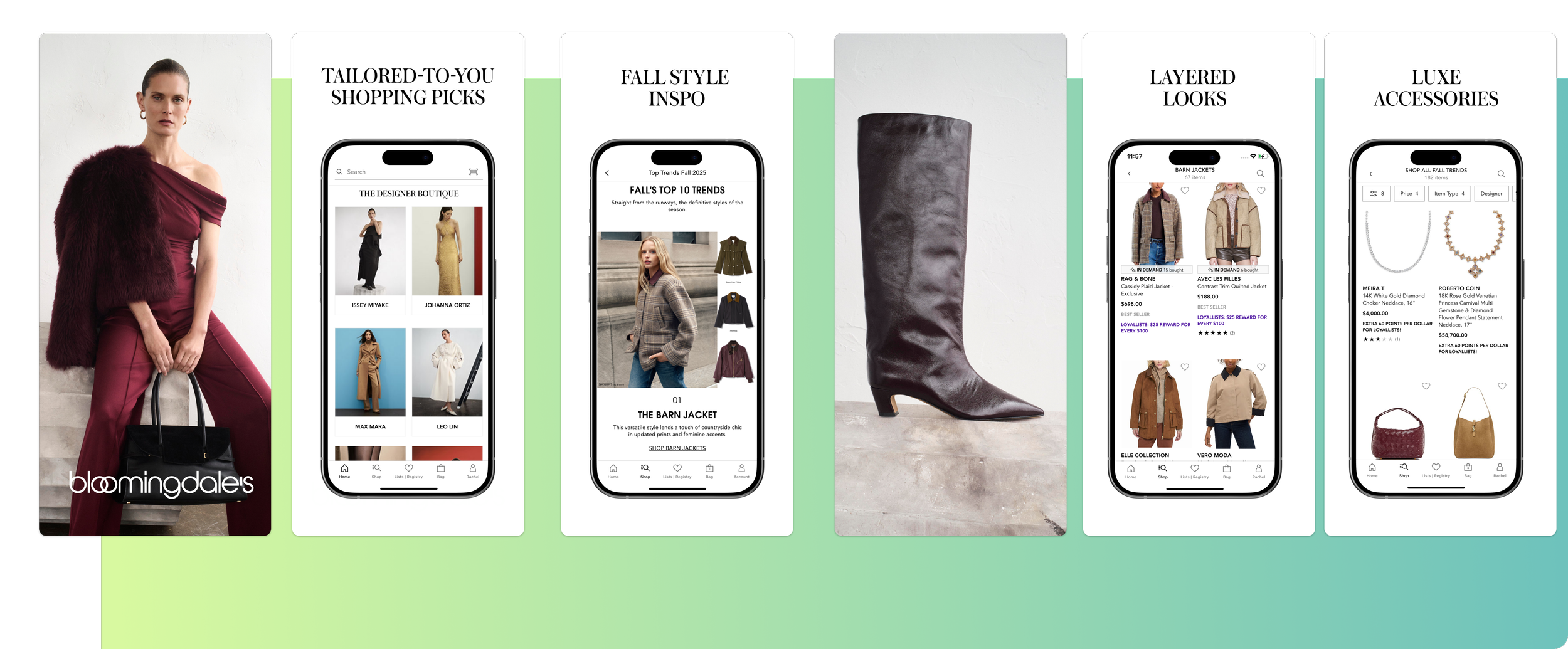
Custom Product Pages dropped in December 2021 (iOS 15) - very cool, but solely a paid-variant playground back then.
In July 2025, Apple quietly flipped the switch on keyword assignment in App Store Connect, meaning these pages can now serve organic search intent, with expectations it’ll stretch into Europe soon enough.
Here it is from Apple directly: “Show different versions of your app product page to people based on their search terms.”
But how does that look in practice? Let’s play pretend.
You’re Harrods.
I’m a customer with a hefty bank balance in need of some retail therapy.
I open the App Store.
I type Barbour into search.
I want a jacket, not an app. A very specific jacket: dark green, padded, new-season, rugged but emotionally soft. You know the one - Barbour-esque.
Scenario 1
I land on a generic App Store listing for menswear.
No visual clue for Barbour at all.
My intent isn’t matched instantly.
Do I spend my time downloading an app when I’m not sure the jacket I want is even available? Absolutely not.
I scroll away. One impression wasted.
Scenario 2
The first screenshot is a model in a pristine Barbour jacket from the newest collection.
Wow, I'm not being sold to, I'm being understood.
Intent matched → download → jacket → ROI for Harrods.
If you already rank for Barbour with enough daily impressions behind it, you can build a store-native persuasion test that matches the motive, not just the merch.
Tip 2: Let Psychology Shape the Hypothesis Before You Test
Generic traffic - from users searching terms like “shopping,” “fashion,” “clothes” - pulls huge volume but carries little context.
You don’t know why they’re searching, only that they are.
That’s why organic testing inside the App Store or Play Store should always begin with motive exploration, not messaging.
Retail behaviour is powered by a handful of psychological drivers - each one a lens you can test through:
Urgency: “I can get this now.”
Convenience: “This saves me time.”
Exclusivity: “This is app-only.”
Trust: “Home to X million shoppers.”
Friction reduction: “This looks simple.”
Social relatability: “People like me use this.”
Aspirational identity: “This is who I want to be.”
In our own organic testing for a leading retail brand, we found that emotional levers consistently outperformed functional ones.
Why? Because users already assume what a retail app does - they’ve been around long enough that what were once USPs have become expectations.
Users expect delivery tracking. They expect wish lists.
Those aren’t selling points - they’re hygiene factors.
Once you accept that, you can free up your creative canvas - your screenshots - for what really differentiates your app: emotion, aspiration, and aesthetic value.
What a Solid CRO Testing Plan Looks Like
Pick one install motivation.
Form a hypothesis tied to payoff.
e.g. “If we express exclusivity through styling rather than app features, installs from generic searches will rise.”Build multiple creative variants.
Measure installs + downstream retail behaviour.
Scale or kill based on decision impact.
The Takeaway
Generic traffic isn’t low intent - it’s undefined intent.
Your job is to uncover the motive behind it.
When you design tests around human psychology, your creative stops making internal assumptions - and starts pulling real weight.
Tip 3: Automate Repetitive App Store Optimization Research So Decisions Happen in the Right Order
Retail apps don’t scale linearly.
They scale through complexity - more markets, more categories, more seasonal moments, more creative variations.
Manual research breaks long before your team does.
At that level, you’re tracking millions of keywords, thousands of competitors, and hundreds of creative experiments - often across overlapping timelines. Every new market or season multiplies the data load.
And that’s where most teams lose time: they make decisions in the wrong order because they’re still digging when they should be deciding.
Dedicated App Marketing AI tools like APPlyzer Chat fix that (it’s part of the new APPlyzer 26 release if you’re interested).
They automate the repetitive, low-value parts of research - keyword tracking, competitor changes, analysis on competitor screenshots, CPP opportunities, Apple Ad placements and much more - so that your team can focus on interpretation, not collection.
In practice, that means what used to take five hours now takes five minutes.
You get instant visibility into:
Which keywords are driving volume right now.
What competitors are doing with their metadata.
Where your next testing opportunity actually is.
When those insights arrive automatically, your testing pipeline stays in the right order:
Detect (what changed?)
Decide (is it worth acting on?)
Design (what do we test next?)
That sequencing is what turns ASO from a reporting function into a growth engine.
Tip 4: Use All of Your App Acquisition Levers (That Means Old or New)
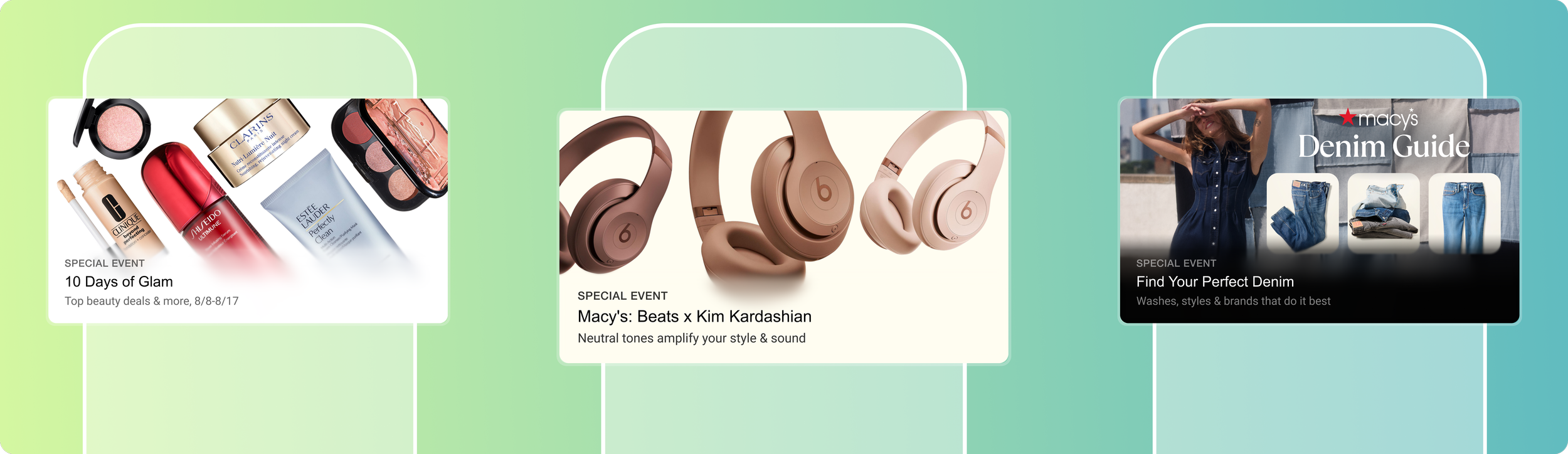
In-App Events for Macy’s App Store listing.
Just because the App Store keeps adding shiny new tools doesn’t mean we can forget the old ones.
We’ve seen this cycle before. A new feature launches, teams rush to it, and the proven fundamentals quietly get left behind.
Keep your cadence steady across your full ASO toolkit, not just the new stuff.
That means:
Regular in-app event publishing (visibility beats silence).
Long description experiments to test semantic and narrative resonance.
Short description testing for clarity and conversion.
Promotional text experiments for powerful discounts or offers.
Icon iterations to track visual response shifts.
Ongoing review and ratings management to protect store health.
Each lever compounds the others. Ignore one, and you skew the data that feeds the rest.
The best-performing teams aren’t just fast - they’re complete.
They stay in rhythm across all levers, every month and every season.
Because in ASO, consistency is the compounding advantage.
Which brings us to the next tip - how to build the process that keeps it all running.
Tip 5: Build Processes That Keep Every Lever Moving and Your App Growing
“You do not rise to the level of your goals. You fall to the level of your systems.” – James Clear
Creative insight is useless without operational gravity.
Most retail app teams don’t fail from lack of ideas; they fail from lack of process.
To keep every lever firing - in-app events, metadata tests, icon iterations, ratings management, and creative refreshes - you need repeatable systems, not one-off sprints.
That means clear ownership, shared visibility, and a cadence everyone can trust.
Weekly check-ins for ASO experiments.
Regular keyword and rating reviews.
Quarterly cross-team retros between ASO, UA, Lifecycle, and Analytics.
Because none of these channels exist in isolation.
Part of those processes means keeping your acquisition efforts plugged in and aligned with the rest of the business.
Your UA strategy, ASO testing, lifecycle messaging, and analytics operations should move in sync - feeding one another, not fighting for attention.
It’s what turns a marketing calendar into an ecosystem. It’s what we call Sustainable Growth.
Align UA, ASO, Lifecycle, and Analytics So They Reinforce the Same Payoff
The brands who convert installs best treat the funnel as a single system:
UA drives the right audience to the store.
ASO matches the payoff to install motivation.
Lifecycle messaging drives the second session.
Analytics measures the downstream retail effect.
When these teams share data, timing, and intent, every message compounds.
If your store preview promises delivery urgency, your onboarding and lifecycle messaging should echo that same motive.
Examples:
Ask for ratings after the first successful purchase or tracking moment.
Prompt for reviews after value, not inactivity.
Use push notifications to trigger return sessions before drop-off.
Let ratings, cart rate, and first purchase retention shape your next store test.
This is also where tools like APPlyzer Chat keep everything grounded, validating rank movement, competitor cadence, and keyword demand before you scale spend.
When your teams and tools run on a shared rhythm, you stop reacting to the App Store and start orchestrating growth.
Retail App Marketing FAQ for 2026
Q1: What exactly is a Custom Product Page (CPP)?
A Custom Product Page is a unique version of your App Store listing that targets specific search terms, audiences, or campaigns. Originally built for paid traffic, CPPs can now be assigned to organic keywords, allowing you to tailor visuals and messaging to different user intents.
Q2: How many Custom Product Pages (CPPs) should I use?
Apple allows up to 35 CPPs, but most brands start with 3–5 focused variants. Each one should serve a distinct search motive — not just aesthetic differences. Quality beats quantity.
Q3: What exactly are In-App Events?
In-App Events are time-limited promotions or updates that appear directly in the App Store (under your app listing or search results). They boost visibility and re-engagement by highlighting launches, sales, or seasonal moments.
Q4: How many Custom Store Listings (CSLs) should I use on Google Play?
You can create up to 50 Custom Store Listings on Play, but, as with CPPs, start small. Each should target a meaningful segment (geography, search intent, campaign). Measure impact before scaling.
Q5: How do I avoid testing too many things at once?
Test one install motivation per experiment, but build multiple creative or copy variants of the same promise. This keeps learnings cleaner and decisions faster.
Q6: Which install motivations scale best for retail apps?
Urgency, convenience, exclusivity, friction reduction, and trust are recurring retail install drivers. Novelty helps capture attention, but urgency typically converts better when payoff is time-bound.
Q7: How often should large retail brands run store experiments?
A healthy 2026 cadence is around 5-8 CPP tests per month, 2-3 CSL experiments per month, and 2-3 in-app events per major retail window. Always tie each experiment to a decision your brand can act on next.
Q8: How can ASO and lifecycle reinforce each other?
Match the store promise in onboarding and push messaging, then prompt for ratings after successful retail actions. Measure installs and downstream behaviours to shape the next test.
Q9: Where does AI help retail marketers most in 2026?
At the research layer: spotting keyword demand, competitor creative cadence, rank movement, and category context, so you can decide what to test before you build or scale.